
If your business does not appear on Google Maps when potential customers search for services in your area, you are losing clients to competitors every single day and the fix is completely free.
A Google Business Profile in Kenya (formerly Google My Business) is the single most powerful free tool available to any Kenyan business looking to attract local customers. When someone searches “web designer in Nairobi,” “plumber near me,” or “salon in Westlands,” it is Google Business Profile listings that dominate the top of the results page, above organic websites, above paid ads, in the prominent map pack that gets the most clicks.
This guide walks you through exactly how to set up and optimise your Google Business Profile in Kenya so your business appears prominently, earns trust through reviews, and converts searchers into paying customers. For related reading on growing your business online, visit our On-Page SEO in Kenya, Web Design Services in Kenya, and E-Commerce Website Design in Kenya pages.
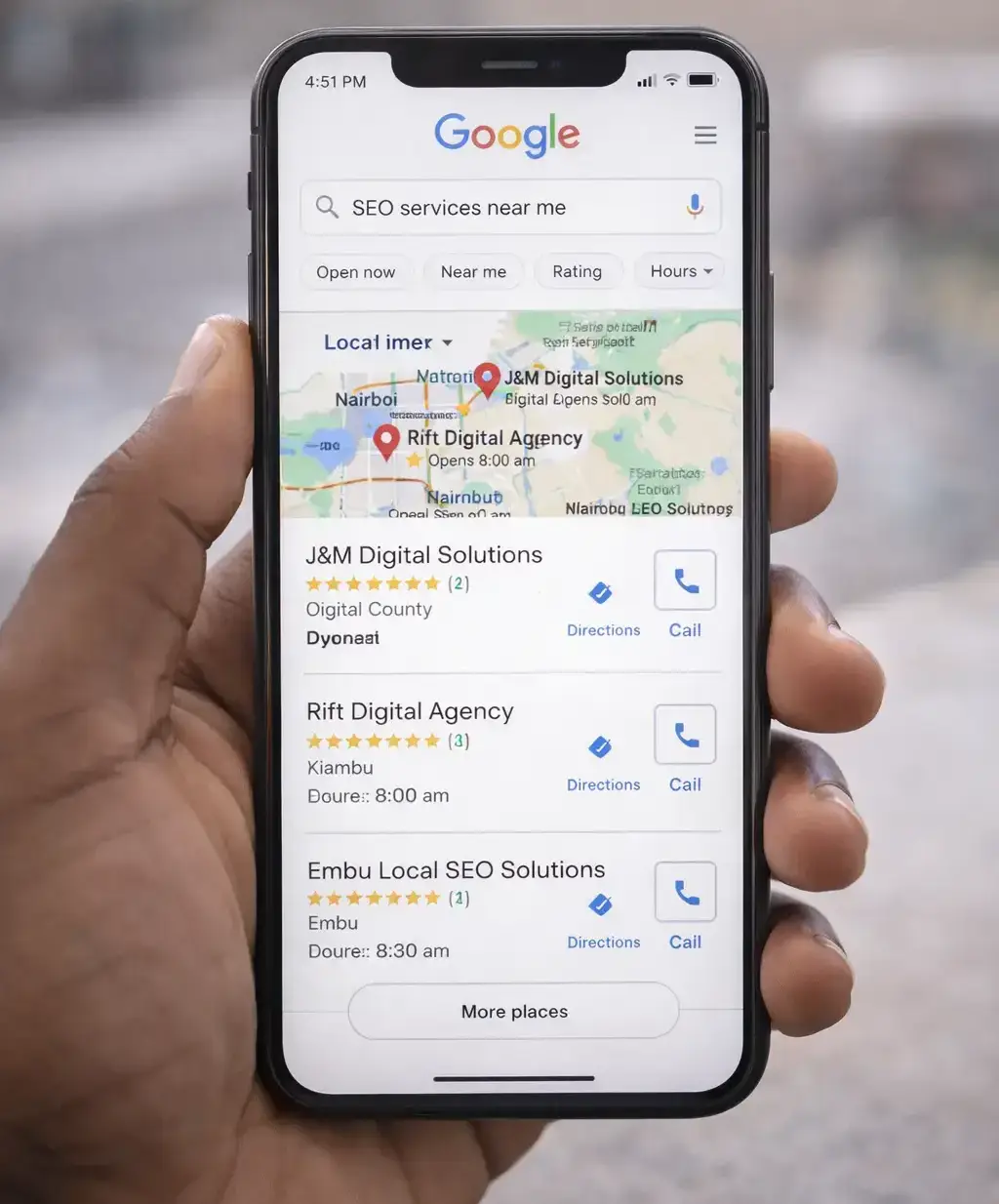
What Is a Google Business Profile and Why Does It Matter in Kenya?
A Google Business Profile is a free listing that controls how your business appears across Google Search and Google Maps. It is the information panel that appears on the right side of a desktop search result, and the card that shows in the map pack when customers search for businesses near them.
Your profile displays your business name, address, phone number, opening hours, website, photos, customer reviews, and more. For many Kenyan customers, this listing is the first impression your business makes and often the only information they need to decide whether to call you, visit, or move on to a competitor.
According to Google’s Business Profile documentation, businesses with complete and accurate profiles are significantly more likely to be considered reputable by customers. In Kenya’s increasingly digital economy, that trust directly translates to phone calls, direction requests, and website visits from potential customers in your area.
Important: Google Business Profile is separate from your website. Having a website does not automatically create or populate your profile. You must claim and set it up manually and the optimisation steps below are what separate businesses that appear at the top of Google Maps from those that are buried or invisible.
How to Set Up Your Google Business Profile in Kenya: Step by Step
Setting up your Google Business Profile in Kenya correctly from the start saves you significant time and avoids the common mistakes that cause listings to be suppressed or suspended by Google. Follow these steps in order.
Go to Google Business Profile and sign in
Visit business.google.com and sign in with the Google account you want to associate with your business. Use a business owned Google account rather than a personal Gmail where possible, so you maintain access if staff members change.
Search for your business name
Before creating a new listing, search your business name to check whether a profile already exists. Google sometimes auto-generates profiles from publicly available data. If you find one, claim it rather than creating a duplicate because two listings for the same business can lead to a suspension.
Enter your business name exactly as it appears in the real world
Use your actual trading name on your signage, receipts, and website. Do not add keywords to your business name (e.g. “J&M Digital Solutions Best Web Design Nairobi”). Keyword stuffing in your business name violates Google’s guidelines and can result in your listing being suspended.
Select your primary business category
This is the single most important ranking factor in your entire profile. Choose the category that most precisely describes what your business does, not a broad one. For example, “Web Design Company” is more useful than “Software Company.” You can add secondary categories later. Take time to research what category your top ranking local competitors use.
Add your location or service area
If customers visit your physical premises (an office, shop, restaurant, or clinic), add your full address. If you serve customers at their location such as a plumber, delivery service, or consultant, select “service area business” and define the areas you cover. You can do both if applicable. For Nairobi businesses, be specific: include your estate or neighbourhood, as many Kenyan searches include location qualifiers like “in Kilimani” or “Westlands.”
Add your phone number and website
Use your primary business phone number, ideally a Safaricom or Airtel line that is answered consistently. If you have a WhatsApp Business number, you can add it in the additional phone field. Add your full website URL. If you do not yet have a website, this is worth addressing as a Google Business Profile linked to a professional website significantly outperforms a standalone listing.
Verify your listing
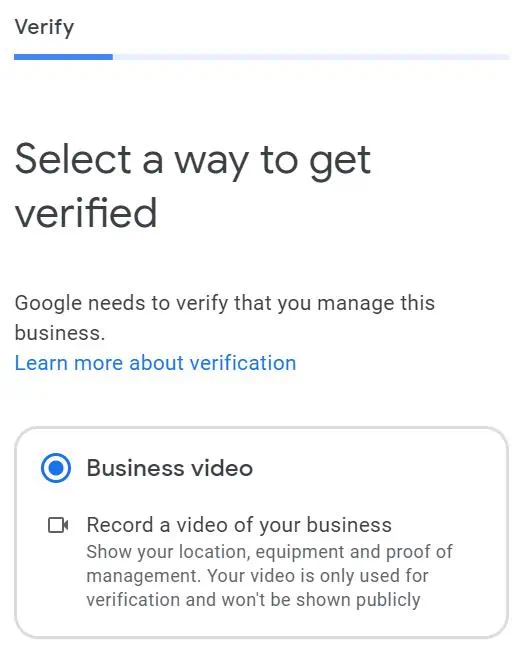
Google requires you to verify ownership of your listing before it becomes fully active. Verification methods available in Kenya include video verification (recording your premises and equipment), postcard by mail to your business address, phone call, or email. Video verification is the most commonly required method for new listings in Kenya in 2026. Follow Google’s on screen instructions carefully as incomplete verification is the most common reason Kenyan businesses cannot get their listing to appear. See the full guidance at Google’s verification help page.
How to Optimise Your Google Business Profile for Better Rankings in Kenya
Claiming and verifying your profile is only the beginning. The businesses that appear at the top of Google Maps in Kenya are not there by accident, they have fully completed and actively maintained profiles. Here is how to optimise yours for maximum visibility.
Complete every section of your profile
Google’s own data shows that complete profiles receive significantly more actions than incomplete ones. After verifying, fill in every available field: business description, opening hours (including public holiday hours), products or services, attributes (such as “wheelchair accessible,” “accepts M-Pesa,” or “free Wi-Fi”), and your website URL. Leaving fields blank is a missed ranking signal.
Write a keyword-rich business description
Your business description (up to 750 characters) is prime space to naturally include the keywords your customers search for. Describe what you do, who you serve, and where you operate. For a Nairobi-based business this might read: “We are a Nairobi web design agency helping Kenyan businesses build professional websites and WooCommerce online stores with M-Pesa integration.” Avoid keyword stuffing, write for the customer first and let the keywords follow naturally.
Add secondary business categories
In addition to your primary category, you can add up to nine secondary categories. These give Google additional signals about the full range of your services. A digital marketing agency in Kenya might use: “Internet Marketing Service,” “SEO Agency,” “Web Design Company,” and “Social Media Agency” as secondary categories alongside their primary. Each additional relevant category expands the searches your profile can appear for.
Upload high-quality photos regularly
Listings with photos receive significantly more direction requests and website clicks than those without. Upload a high resolution logo, a cover photo, interior and exterior shots of your premises, photos of your team at work, and images of your products or completed projects. For Kenyan businesses, authentic local photos outperform stock images as customers want to see your actual premises and people before they visit or call.
Continue adding new photos regularly. Google rewards active profiles, and fresh photos signal that your business is open and engaged. Aim for at least two to four new photos per month.
Set up your products and services
Use the Products and Services sections to list what you offer with descriptions and prices where appropriate. This content appears on your profile and can appear in Google search results directly. For a Kenyan services business, this might include individual service listings such as “Website Design — from KES 35,000” or “M-Pesa Integration — from KES 15,000.” Customers can see this detail without even visiting your website.
Enable messaging
Google allows customers to send messages directly to your business from your profile. Enable this feature and respond promptly as Google tracks your response time and displays it publicly. A “Typically responds in a few minutes” badge builds significant trust with prospective customers in Kenya, where WhatsApp-speed responsiveness is an expectation.
Pro tip: Keep your Name, Address, and Phone number (NAP) identical across your Google Business Profile, your website, your Facebook page, and any other online directory where your business appears. Inconsistent NAP information across the web is one of the most common reasons local rankings in Kenya underperform. Even minor differences like “Nairobi” vs “NBI” or “+254” vs “0” can dilute your local SEO signals.
Real Result: How a Westlands Salon Went from Zero Visibility to 80+ Google Reviews in 90 Days
Client: Hair & beauty salon, Westlands, Nairobi
When this client came to us in late 2025, their Google Business Profile had been sitting unclaimed for over a year. They had no reviews, no photos on the listing, and were appearing on page two of Google Maps for searches like “hair salon Westlands” and “braiding Nairobi” which is invisible to most potential customers.
We set up and fully optimised their profile over three days: claimed the listing, completed every field, selected the most specific applicable primary category (“Hair Salon” rather than “Beauty Salon”), added nine secondary categories covering individual services, uploaded 22 photos taken on-site, listed every service with descriptions and prices in KES, added M-Pesa as a payment attribute, and published their first Google Post.
We then ran a simple review generation campaign: a WhatsApp message with a direct review link sent to their existing client base immediately after each appointment.
Within three months the salon was ranking in the Google Maps top three for their primary search terms, receiving an average of 28 direction requests per month through their listing, and the owner reported that new clients were consistently mentioning they found the business on Google. The profile had become their single highest-performing source of new customer enquiries at zero ongoing cost.
The results above are representative of what a well-optimised profile can achieve. Timelines and outcomes vary depending on your market, competition level, and how actively you pursue reviews.
Managing and Growing Google Reviews for Your Kenyan Business
Google reviews are one of the most powerful ranking factors in local search, and one of the most persuasive trust signals for Kenyan customers deciding between businesses. A business with 4.8 stars and 80 reviews will almost always outrank and out-convert a competitor with 3.2 stars and 5 reviews, even if the lower-rated business has a better website.
How to ask for reviews effectively
The most effective way to get Google reviews in Kenya is simply to ask as most satisfied customers are happy to leave one if the process is made easy for them. Generate your direct review link from your Google Business Profile dashboard and share it via WhatsApp, SMS, or email immediately after a successful job or purchase. A message as simple as “Thank you for choosing us, if you’re happy with our work, we’d really appreciate a quick Google review: [link]” converts well.
Never offer incentives in exchange for reviews, this violates Google’s review policies and can result in your listing being suspended.
How to respond to reviews
Respond to every review, both positive and negative. For positive reviews, a personalised thank-you that references the specific service or product shows authenticity. For negative reviews, respond calmly and professionally, acknowledge the concern, and offer to resolve the issue offline. How you respond to a bad review often matters more to prospective customers than the review itself. Google also rewards businesses that actively respond to reviews with better visibility.
Using Google Business Profile Posts to Stay Active
Google Posts allow you to publish updates, offers, events, and new product announcements directly to your profile. These posts appear on your listing in Google Search and Maps and are one of the clearest signals to Google that your business is active and engaged.
For Kenyan businesses, effective post types include: seasonal promotions (end of year offers, back to school discounts), new service announcements, before and after project showcases, and team or business updates. Posts expire after seven days for general updates, so aim to publish at least one new post per week to maintain freshness signals. Include a clear call to action in every post like “Call now,” “Get a quote,” or “Visit our website.”
Common Google Business Profile Mistakes Kenyan Businesses Make
| Mistake | Why it hurts you | How to fix it |
|---|---|---|
| Keyword stuffing in the business name | Violates Google guidelines and can lead to listing suspension | Use your real trading name only, add keywords in the description and services instead |
| Wrong or inconsistent phone number | Customers cannot reach you; NAP inconsistency hurts local rankings | Audit all platforms and ensure phone number is identical everywhere |
| Incomplete or missing opening hours | Google penalises incomplete profiles; customers lose trust | Fill in all days including public holiday hours; update when hours change |
| No photos or outdated photos | Listings without photos receive far fewer clicks and direction requests | Upload at least 10 quality photos at launch, then add 2–4 new ones monthly |
| Ignoring reviews, good or bad | Low engagement signals to Google that the business is inactive | Respond to every review within 24–48 hours |
| Choosing a too-broad primary category | Reduces relevance for specific searches where customers are most likely to convert | Research competitors’ categories and choose the most specific applicable option |
| Duplicate listings | Splits your reviews and signals; Google may suspend both listings | Search for existing listings before creating a new one; merge or remove duplicates |
| No Google Posts activity | Profile appears stale; missed opportunity for additional keyword indexing | Publish at least one post per week with a clear call to action |
Why a Professional Website Strengthens Your Google Business Profile
A Google Business Profile and a professional website are not alternatives, they work together. Your profile drives local discovery and immediate contact, while your website provides the depth of information, credibility, and conversion infrastructure that turns a curious searcher into a committed customer.
Google uses signals from your website like its content, speed, mobile experience, and the keywords it targets to better understand what your business does and who it serves. A well built website strengthens your profile’s relevance for competitive search terms and increases the total surface area of your business that Google indexes and ranks.
Businesses with no website or a poorly built one consistently rank lower in the local map pack than competitors with strong websites, even when the profile itself is well-optimised. If your website needs attention, see our web design services in Kenya page, or our on-page SEO service if you want to improve how your existing site ranks.
How J&M Digital Solutions Can Help with Your Local SEO in Kenya
At J&M Digital Solutions, we help Kenyan businesses get found on Google both through professionally built websites and through Google Business Profile setup and optimisation as part of our broader SEO services in Kenya.
Whether you need your profile created and verified from scratch, an existing listing audited and optimised, or a full local SEO strategy that combines your profile with a well built website, we handle the work so you can focus on running your business.
Why choose J&M Digital Solutions for your Google Business Profile and local SEO
- Full Google Business Profile setup, verification, and optimisation for Kenyan businesses
- NAP consistency audit across your website, social media, and online directories
- Keyword research specific to your business category and Kenyan location
- Category selection strategy based on competitor analysis in your market
- Photo strategy and post scheduling to keep your profile active and ranking
- Review generation strategy and response management guidance
- Integration with a professionally built WordPress website for maximum local SEO impact
- Transparent reporting on profile views, direction requests, calls, and website clicks
Need Help Setting Up or Optimising Your Google Business Profile in Kenya?
J&M Digital Solutions helps Kenyan businesses get found on Google Maps and local search. From full profile setup and verification to ongoing optimisation and review strategy, we handle everything so your business appears at the top when customers search for what you offer.
Phone / WhatsApp: +254 769 604 780
Website: jmdigitalsolutionske.com
Service area: Serving businesses across Kenya
Frequently Asked Questions
Is Google Business Profile free for Kenyan businesses?
Yes, Google Business Profile is completely free to create, claim, and manage. There is no charge to appear on Google Maps or in local search results. The only costs involved are if you hire a professional to set up and optimise your profile on your behalf, or if you run Google Ads to appear in paid positions alongside your organic listing.
How long does it take for a Google Business Profile to appear in Kenya?
Once your listing is verified, it typically becomes visible in Google Search and Google Maps within a few days to two weeks. Competitive rankings in the local map pack take longer, usually one to three months of consistent optimisation, photo uploads, review activity, and Google Posts. New listings often rank more quickly for less competitive searches such as your exact business name or niche service in a specific suburb.
What is the most important thing to do when setting up a Google Business Profile in Kenya?
Choosing the right primary business category is the single most impactful decision you make during setup, it determines which searches your profile is eligible to rank for. After that, completing every available field, uploading quality photos, and actively requesting reviews from satisfied customers are the three actions that will most quickly improve your visibility in Kenyan local search results.
Can I add M-Pesa as a payment attribute on my Google Business Profile in Kenya?
Yes. Google Business Profile allows you to add payment method attributes to your listing. You can indicate that your business accepts M-Pesa, cash, card, and other payment methods. These attributes appear on your profile and can influence customer decisions before they even contact you. Add every payment method you genuinely accept to avoid customer confusion on arrival.
My Google Business Profile was suspended in Kenya, what do I do?
Google suspends listings that violate its guidelines, most commonly for keyword stuffing in the business name, using a virtual office or PO box address as a physical location, or creating duplicate listings. If your profile is suspended, review Google’s guidelines to identify the likely cause, correct the issue, and submit a reinstatement request through the Google Business Profile help centre. Reinstatement typically takes one to three weeks. For persistent suspension issues, working with a local SEO professional familiar with Kenya’s common suspension triggers is advisable.
Do I need a website to have a Google Business Profile in Kenya?
You do not need a website to create a Google Business Profile in Kenya, but having one significantly improves your local search rankings and conversion rate. Google uses signals from your website to better understand what your business does, which strengthens your profile’s relevance for competitive keywords. Businesses with professional websites consistently outrank those with profile-only listings for any search term beyond their exact business name.